Precheck
Checks an Assets CSV import file against the live schema and lists each problem by line and column, before you run the import.
- Catches what the native import rejects late or drops without an error: values of the wrong type, references with no match, unknown statuses and select options, repeated unique values.
- Exports objects with names instead of IDs.
- Scans an object type for empty, duplicate, unlinked and stale objects, with the AQL that lists each set.
- Reads only and stores nothing. Free for up to 10 users.
Why
Assets CSV imports fail late. A run can stop with "Failed" after it has already created half the objects, and the error list names each rejected object by its label, not by its line in your file. Some problems never show up at all. In our test, the native import left a number empty when the cell said "ten" or "3.5", left a reference empty when no object matched, linked one of two objects that shared a label, dropped a user given by display name, dropped an unknown status, and added "silver" as a new select option next to "Silver". None of those produced an error.
Install
Install from the Atlassian Marketplace as a Jira site administrator. Your site needs Assets, which comes with Jira Service Management Standard, Premium and Enterprise; the Free plan has no Assets API. The app asks for read scopes only. It has no storage and makes no network calls outside Atlassian.
Open the app
In Jira, open Apps and choose Precheck. Anyone who can use Jira can open it. Every call runs as the person using it, so each person sees only the schemas and objects their Assets permissions allow. The page has three tabs: Import check, Readable export and Data quality. The object type you pick is shared between them.
Import check
- Choose the schema and object type the import writes to.
- Load the CSV and pick its delimiter. The file must have a header row, as for the native import; several values in one cell are separated by
||. - Copy the settings from the import structure you will use: date format, date-time format, empty values, unknown values and identifier matching. The defaults are the native defaults: dates auto-detected, unknown values added, identifiers case-sensitive.
- Confirm how the columns map to attributes, and which attribute identifies an object. For a reference column, choose whether it matches on the label or on another attribute.
- Run the check.
The file is read in your browser. Only the values that need a lookup, such as identifiers, unique values, references, account IDs and group names, are sent to Atlassian to check them.
What is checked
- required attributes, and how many values each attribute takes;
- integers, numbers, booleans, dates and date-times, email addresses, URLs and IP addresses;
- select options and statuses;
- regular expressions set on attributes, and that text values are shorter than 255 characters;
- unique attributes, within the file and against existing objects of the type and its child types. Values are compared as written, so the same date written in two formats is not caught;
- references, matched on the label or the attribute you choose;
- users by account ID and groups by name. Users given by email are flagged for you to confirm, since the app cannot look them up;
- repeated identifiers, and which rows would create an object and which would update one.
Results
Errors mark invalid values and problems that stop Precheck from checking a row reliably. Warnings flag values the import may change or add, and things to confirm by hand. The results table filters by severity and code. Download findings gives the findings as a CSV, and Download file with results gives your original file with two columns added that say what is wrong with each row. Errors that apply to the whole file are repeated on every row.
Readable export
Writes a CSV of the selected object type with the columns you choose. References come out as labels or object keys, and users as display names. The object key and object type columns are optional, and so are child types. By default the export includes the selected object type. An optional AQL query replaces that filter; include an objectTypeId constraint to keep it. Columns still use the selected type's attributes, so returned objects without them get blank cells. The file starts with a UTF-8 byte order mark so Excel reads the encoding.
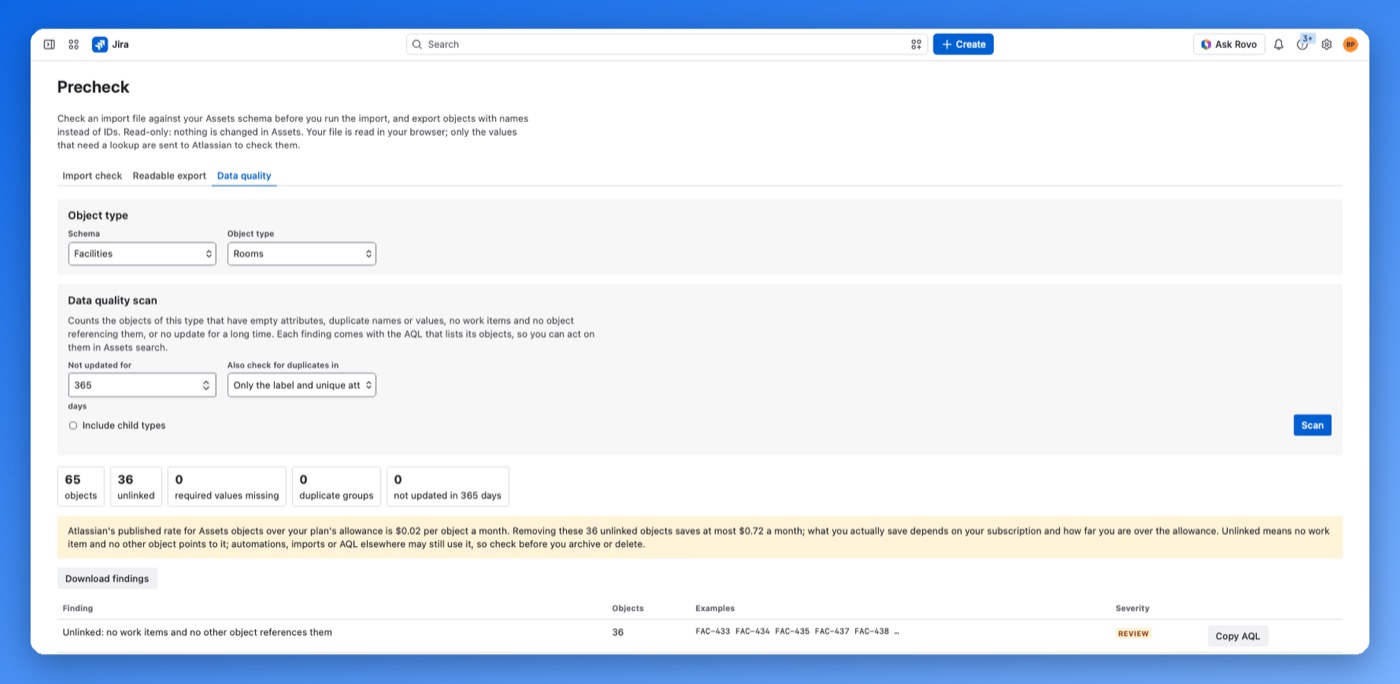
Data quality scan
Scans one object type, and its child types if you tick the box. It counts:
- objects with empty attributes, with required ones counted separately (text area attributes are not searched);
- labels and unique text values that differ only in letter case or leading and trailing spaces, plus one more eligible attribute of the selected type;
- objects with no work items and no other object pointing to them;
- objects not updated within a number of days you set.
Each finding comes with the AQL that lists its objects, so you can open them in Assets search, and the findings download as a CSV. Atlassian bills Assets objects over the plan's allowance, so the scan shows the most that removing the unlinked ones could save. Unlinked objects may still be used by automations, imports or AQL elsewhere, so check before you archive or delete them.
What the app does not do
- It does not run the import or change anything in Assets. The scan lists objects; archiving or deleting them is up to you, in Assets.
- It checks CSV files only. JSON, LDAP and external imports are not covered.
- It checks against the settings you give it. If they differ from your import structure, the results will too.
Limits
50,000 rows or 20 MB per file, 50,000 objects per export, and up to 50,000 objects analysed for duplicates. Split a larger file and check each part; duplicates and repeated identifiers are compared only within one file.
Data and privacy
Precheck stores nothing. It has no database, no file storage and no scheduled jobs, and nothing is kept after the page closes. Errors are logged as a function name and an error type, never with values from your data. Details in the privacy policy.