Linked Table
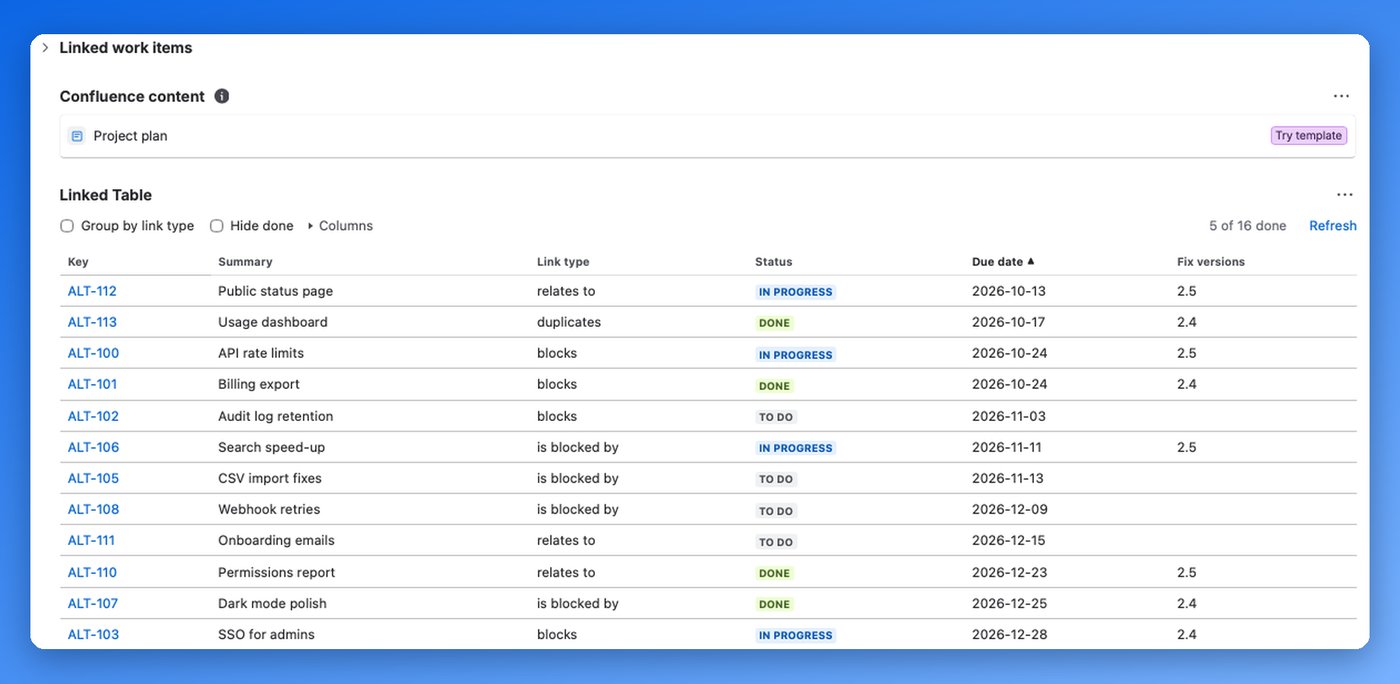
A Jira work item panel that lists linked work items as a table, with the columns you pick.
- Sort by any column: due date, status, priority, key, fix version and more.
- Pick from fifteen built-in fields, including due date, fix versions, components and labels.
- Group by link type with done counts, and hide finished work items.
- Free. Runs in your browser as you, with no backend.
Why
Jira's linked work items section shows a fixed set of fields and can't be sorted. With twenty or thirty links, finding the next one due or the open blockers is slow.
Install
Atlassian is reviewing the Marketplace listing. Until it is approved, email support@altoria.app for early access. After that, a Jira site administrator installs it from the Atlassian Marketplace. It works in any Jira product with issue links. It asks to read work items and to save each person's settings to their Jira profile. It has no backend and calls only Atlassian.
Linked Table is free. The terms page lists the agreements that apply.
Add the panel
On a work item, select View app actions (the apps button under the title) and choose Linked Table. The panel appears below the other sections and stays on that work item. To show it on every work item, open the panel's … menu and choose Show for all work items.
The panel reloads when the work item changes. Select Refresh to reload it.
Columns and sorting
Open Columns to choose from key, summary, link type, type, status, priority, assignee, reporter, created, updated, due date, resolution, fix versions, components and labels. The default is key, summary, status, assignee, due date and fix versions.
Click a column header to sort, and click again to reverse. Status sorts To Do, In Progress, Done. Keys sort by project, then number, so ABC-9 comes before ABC-12. Empty values go last in both directions.
Your column, sort, grouping and Hide done settings are saved to your own Jira profile and apply to every work item.
Groups and done counts
Group by link type groups links by Jira's link names, such as blocks and is blocked by. Each group shows how many are done. Turn grouping off for one list with a Link type column.
Hide done hides work items whose status is in the Done category. The counts still include them, and a group with everything done says "All done."
Work items you cannot see
Every call runs as you, so the panel shows only work items you can browse. If Jira lists a link but not its details, the row shows the key and link type and says the details are unavailable. Those links have their own count and are left out of the done count. Work items that search leaves out, such as those in archived projects, are read one by one.
What the app does not do
- It doesn't change work items or links. It only saves your own settings.
- It lists issue links only, not subtasks, child work items or remote links.
- Custom fields cannot be chosen as columns.
- Priority sorts in the default scheme's order, Highest to Lowest. Reordered or added priorities may sort out of order.
- Settings are per person. There is no project-wide default.
Data and privacy
Linked Table has no backend functions, database, file storage or scheduled jobs. It saves one Jira user property, altoria-linked-issues-prefs, on your own profile, with your settings and no work item data. Details in the privacy policy.